

The short answer
Most people guess months, or even years. Nope! A first real website takes days, and the basics take about three weeks, if you do things in the right order.
- 12secondsto see that HTML is actually easy
- Daysfor a first real site, if someone shows you the order
- 3weeksfor the basics, a few hours twice a week
- Monthsof building and breaking things before you charge clients
My record is 12 seconds. That’s how long it once took me to prove to someone that HTML is actually easy, and I’ve been teaching it long enough to be a bit smug about that number.
So when someone asks me how long it takes to learn web design, they’re usually expecting me to say months, or “it depends” (which is true, but useless). The honest answer is short, but only if you do things in the right order. Most people who teach themselves open a code editor on day one, copy something off YouTube, get a weird gap at the top of the page they can’t get rid of, and decide they’re “not a coding person”.
The timings on this page come from years of teaching beginners, not from a study, so I’ve tried to back up everything else with sources you can check yourself. They’re numbered, and listed at the bottom.
Would you start with the wallpaper if you were building a house?
Carl Heaton, on this blog in 2010
Don’t just take my word for it
Four numbers that say web design is smaller than you think
tap a card to see where it comes from
Step 1 · Day 1
Start with a pen, not a laptop
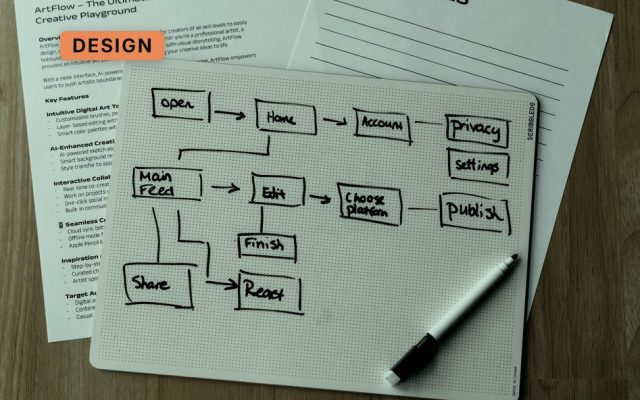
Grab some scrap paper and scribble out your pages: what’s on the home page, what’s on the about page, where the contact bit lives. That’s a sitemap and a few rough wireframes, and they save you hours later, I promise.
I’m not the only one who says this. Even MDN, the reference most web developers keep open all day, begins its first-website guide with planning, before a single line of code: “you should plan it first”.2
Go deeper
Step 2 · Days 2–3
Then HTML, which really is the easy part
HTML is just labels for your content. This is a heading, this is a paragraph, this is a picture. There are well over 100 of them,4 which sounds scary, but you won’t need most of them: a typical page gets by on just 32 different tags.3 Here are the ones you’ll meet first, so go on, tap one.
Now try it for real. Here’s a whole home page for a little café. Change the words on the left and watch the page on the right.
Go deeper
Step 3 · Week 1
CSS is where it gets fun
This is where it gets fun, because now you’re picking fonts and colours and making the page look like a website rather than a Word document from 1997. Don’t take my word for it, drag the handle and see the same HTML with and without CSS.
Go deeper
Step 4 · Week 2
The wall everyone hits
Nearly always it’s CSS layout. Putting two boxes side by side should be simple, and it is once you get it, but the first time it feels like the page is fighting you. And it isn’t just beginners! When the State of CSS survey asked working developers about their layout pain points in 2025, Grid alone came up 272 times and flexbox problems another 125.6
The good news is it’s one wall, not a hundred, and once you’re over it the rest of CSS starts to make sense. Flip the switch and you’ll see the one line that gets you over it. It works in about 97% of the browsers people actually use.5
.card {
  display: block;
}Go deeper
Step 5 · Week 3
Going live
You’ve built something lovely on your laptop, and suddenly there are words like hosting and domains flying about. It’s not hard, it’s just unfamiliar, and it’s much easier with someone sat next to you the first time. These days you don’t even need a server to start. Any of these will put a folder of HTML and CSS on the actual internet, for your mum to look at.

Save yourself weeks
What to learn now, and what to ignore
Learn now
- Planning a site on paper
- HTML: headings, paragraphs, links, images
- CSS: fonts, colours, spacing
- Layout with flexbox
- Putting a site live
Ignore for now
- JavaScript frameworks
- Animation libraries
- The 47 “best VS Code extensions” videos
- Arguments about which framework is dead this week
I’m not making this list up to be bossy. MDN’s own curriculum sends beginners to the core HTML and CSS modules first, and frameworks don’t turn up until module 7.1 The Odin Project does the same, with HTML, then CSS and flexbox, and no JavaScript until after that.7
Going it alone?
Your first week, an hour or two a day
Fancy having a go on your own first? Fine by me! Here’s the order I’d do it in. Pick one little site (a page about your dog will do) and build it from start to finish, and every link below goes to a free guide.
So how long, really?
Three weeks to know if you love it
For the basics? I’d say three weeks, give or take. A few hours, a couple of times a week, and you actually build something, you don’t just sit there watching videos about building something! One free course that’s taught loads of people puts it better than I can: “The most effective learning happens while building projects”.7
By the end you’d have your own little site online and, more to the point, you’d know if you like doing it. Some people find out they love the code side, some love the design side, and a few find out it’s not for them at all, which is a perfectly good result too (cheaper to learn that in three weeks than three years).
Getting good enough to charge clients takes longer, obviously. Months of building things, breaking things and building them again. Is it worth the effort? Over in the US the typical web developer or digital designer earned $99,520 last year, and the government expects jobs to grow 5% over the next ten years.10 Those are American figures, not Bangkok ones, so I wouldn’t wave them at a landlord, but they do tell you the work isn’t going away.
And you’d be in good company. In Stack Overflow’s 2025 survey, two thirds of the people learning to code said they were using HTML and CSS.11 The first step is short, and I think a lot of people never start because they imagine it’s much longer than it is.
Try this today
Build a page about your dog
Tick them off as you go. Your progress stays on this device.
Then come and tell me how long it took you.
If you’d like someone next to you
Web Design Essentials
You plan your site first, then write the HTML and CSS by hand, and then we put it live together. You walk out with a website you made, not just a certificate and a vague feeling.
See the course- 6 lessonsover 3 weeks, 18 hours in class
- Tue & Thu3pm to 6pm
- Small groupat True Digital Park, Bangkok
- No experienceneeded, honestly none
Sources
Where the numbers come from
- MDN Curriculum. Mozilla, updated October 2025. Core modules (HTML, CSS, layout) before Extensions, where frameworks sit.
- Your first website. MDN, 2025. Plan, content, styling, interactivity, publishing.
- Web Almanac 2024: Markup. HTTP Archive. Median of 32 distinct elements per mobile page; div 28.7%, a 12.6%, span 11.2%.
- HTML elements reference. MDN. Well over 100 elements listed, some obsolete.
- CSS Flexible Box Layout. Can I Use, October 2026. 97.49% global support.
- State of CSS 2025: Layout. Free-text pain points: Grid 272 mentions, flexbox issues 125. A survey of working developers.
- About The Odin Project and its Foundations course.
- Creating a GitHub Pages site. GitHub Docs.
- Create deploys. Netlify Docs. “No account required” for Netlify Drop.
- Web Developers and Digital Designers. US Bureau of Labor Statistics, Occupational Outlook Handbook, 2026. Median pay 2025; projected growth 2025–35.
- 2025 Developer Survey: Technology. Stack Overflow. HTML/CSS used by 66.6% of people learning to code.