




Updated September 2026: every site re-checked, one renamed, three added, and a short answer to which CMS SaaS websites use.
In short: the best SaaS websites in 2026 say what the product does in a few plain words, show the real product straight away, let you start with one field or one button, and put customer proof right under the fold. Our picks: AirOps, Ghost, Ramp, ClickUp, Assembly (formerly Copilot), Linear, Attio and Notion. There is no single best CMS for a SaaS site; the one your marketing team can update without a developer is the right one.
A well-designed SaaS website improves the user experience, engagement and conversions. We first published this list in March 2025. For 2026 we went back to all five sites, found that most had been redesigned (and one had changed its name), and added three more that are worth studying. For each one we set out its UX/UI strengths, the places it falls short, and what is worth borrowing.
1. AirOps – AI Search Visibility
 Screenshot: airops.com, September 2026
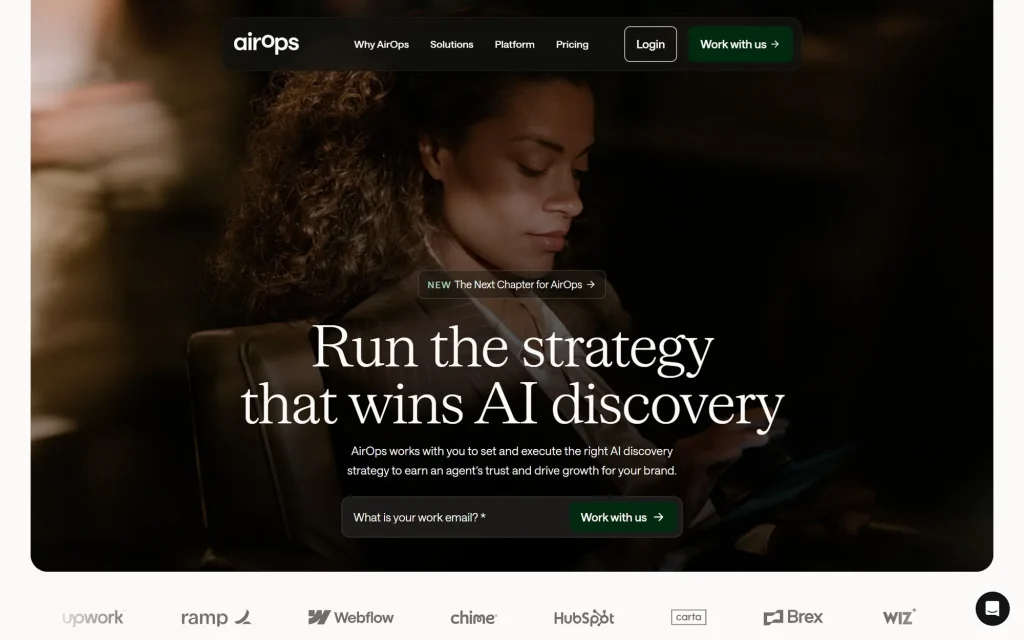
In 2025 AirOps sold AI workflow automation for content and SEO. In 2026 it has repositioned around being found in AI answers, with the headline “Run the strategy that wins AI discovery”, and the website changed with it: a full-width, cinematic photo, a large serif headline and a warm off-white palette that feels more like a magazine than a software site.
👍 UX/UI strengths
- An email field and a “Work with us” button sit right in the hero, so there is one obvious next step.
- Customer logos (Chime, HubSpot, Carta, Brex, Wiz) sit directly under the hero, where they build trust early.
- A floating, pill-shaped navigation bar with only four items keeps the page calm.
👎 Areas for improvement
- The hero photo says nothing about the product; you have to read and scroll to learn what AirOps actually does.
- A long statement paragraph comes before any product detail.
- In 2025 we asked for more engaging visuals; they arrived, but as mood photography rather than a look at the product near the top.
Borrow this: customer logos right under the hero, and a single field to start.
2. Ghost – CMS for Writers
 Screenshot: ghost.org, September 2026
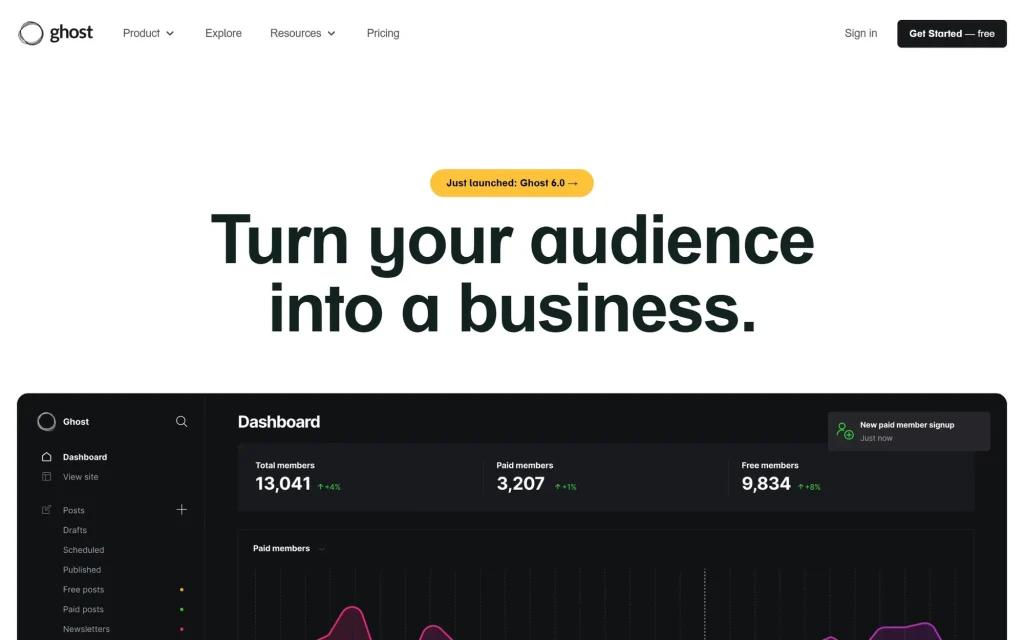
Ghost is an open-source publishing platform for blogs, newsletters and paid memberships. Its homepage is a model of focus: a six-word headline, “Turn your audience into a business.”, and directly beneath it a large screenshot of the real Ghost dashboard with members, paid subscribers and revenue.
👍 UX/UI strengths
- The product is the hero image, so you see what you would be using before you read a word of copy.
- A small announcement pill (“Just launched: Ghost 6.0”) shows the product is moving without taking over the page.
- Short navigation (Product, Explore, Resources, Pricing) and one dark “Get Started — free” button.
👎 Areas for improvement
- “Free” in the button leads to a 14-day trial; Ghost(Pro) has no free plan. The free route is self-hosting the open-source version, which is not for beginners.
- The dark dashboard is dense and data-heavy for someone who has never run a newsletter.
- More guidance on choosing between the hosted plans would help first-time publishers.
Borrow this: show the real product, big, straight under a short headline.
3. Ramp – Corporate Spend Management
 Screenshot: ramp.com, September 2026
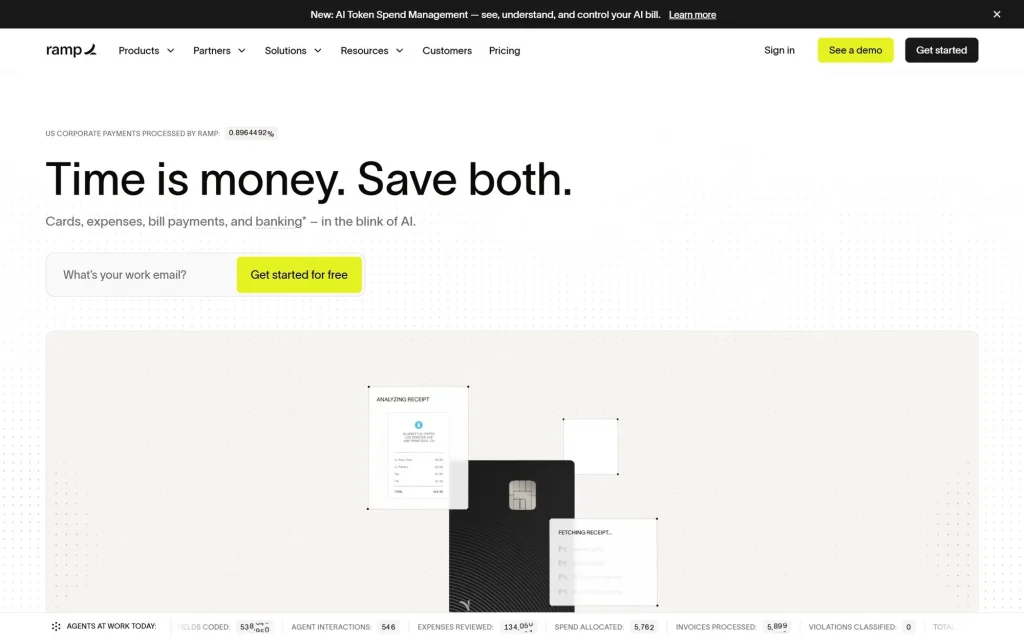
Ramp does corporate cards, expenses, bill payments and banking. Its homepage opens with “Time is money. Save both.”, a live counter of corporate payments processed, and an email field with a bright lime “Get started for free” button on a clean white page.
👍 UX/UI strengths
- A witty, five-word headline and a one-line explanation of what the product does.
- High contrast: black type, white space and one accent colour that is used only for actions.
- Customer proof is now front and centre: a grid of well-known customer logos with a case-study card claiming “$1M+ saved on global spend”. In 2025 we said Ramp lacked success stories; that is fixed.
👎 Areas for improvement
- An announcement bar, the navigation, “See a demo” and “Get started” all compete for attention at the top.
- Headlines split into a black half and a light grey half; the grey half is harder to read, especially on a phone in sunlight.
- The feature explanations still lean on big claims more than on showing how things work.
Borrow this: pair customer logos with a concrete result.
4. ClickUp – Productivity & Project Management
 Screenshot: clickup.com, September 2026
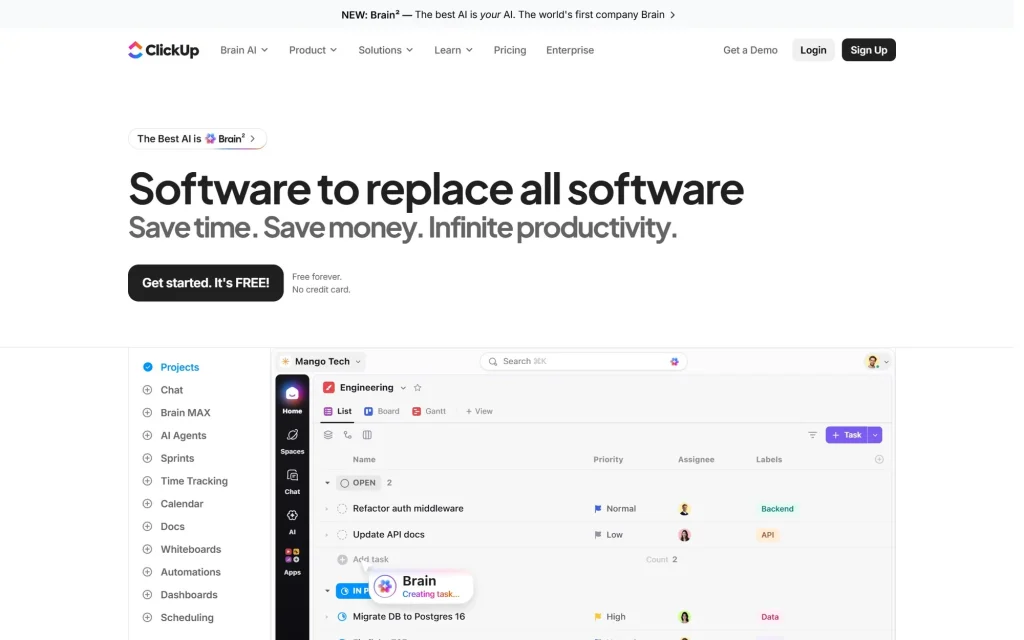
ClickUp’s headline is its boldest yet: “Software to replace all software”. Under it, a black “Get started. It’s FREE!” button carries a small reassurance next to it (“Free forever. No credit card.”), and a large product view shows a task list alongside a sidebar of everything ClickUp now does, from chat to AI agents.
👍 UX/UI strengths
- The reassurance text next to the button answers the two questions that stop people signing up.
- The real interface in the hero, with its feature sidebar, shows the breadth of the product at a glance.
- Clear illustrations explain the problem it solves (switching between too many apps) before the features.
👎 Areas for improvement
- The page mirrors the product’s own weakness: feature overload. Mega-menus, AI branding and long sections compete for attention.
- Lots of statistics (“60% of work is lost in context”) with little on where they come from.
- It is heavy: when we fetched the homepage in September 2026, its HTML alone was over 2 MB, before any images.
Borrow this: answer “Is it free? Do I need a card?” right next to the sign-up button.
5. Assembly (formerly Copilot) – Client Portals and Apps for Firms
 Screenshot: assembly.com, September 2026
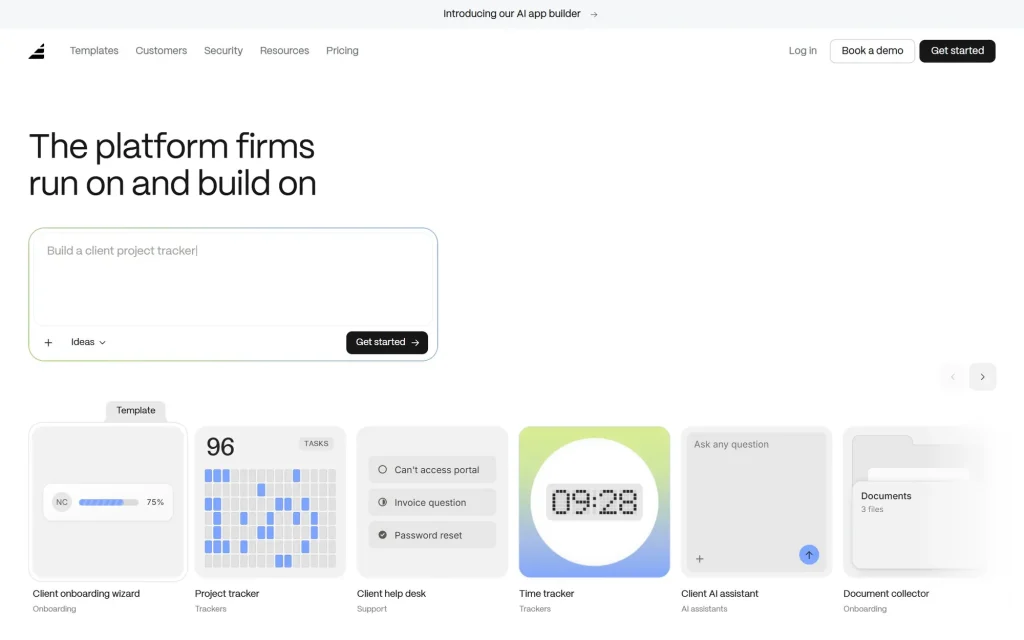
In 2025 this entry was Copilot, a client portal for managing client communication, payments and projects. The company now trades as Assembly (its old copilot.app address redirects to assembly.com), while the copilot.com domain now belongs to Microsoft Copilot, so we have taken the old link out. Assembly has also moved towards an AI app builder for professional services firms: “The platform firms run on and build on”.
👍 UX/UI strengths
- The hero is the product: a prompt box where you describe the app you want, with a “Get started” button inside it.
- A row of template cards (client onboarding, project tracker, help desk, time tracker) shows what you could build in seconds.
- A four-step tabbed demo (Describe, Plan, Publish, Iterate) explains the workflow without a video.
👎 Areas for improvement
- After a new name and a new direction, existing Copilot customers get little on the page to tell them they are in the right place.
- The client portal, the original product, is hard to find from the homepage.
- Stat counters animate in from blank digits, so a quick glance can catch half-drawn numbers.
Borrow this: let visitors try the core action in the hero.
6. Linear – Product Development and Issue Tracking
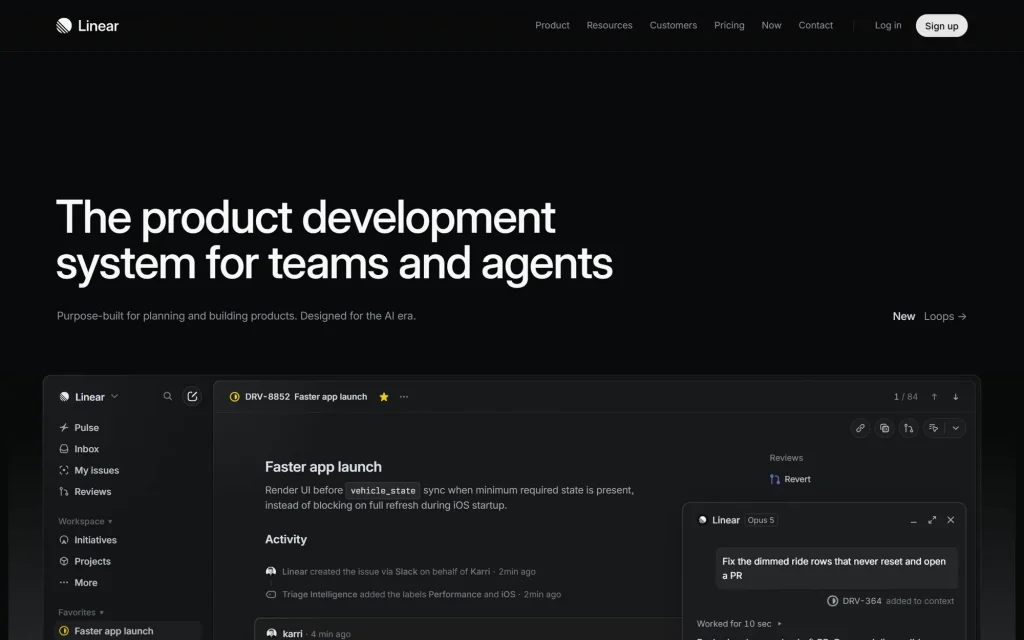 Screenshot: linear.app, September 2026
Linear’s website has inspired countless startup sites, and it still shows why. A dark page, precise typography, “The product development system for teams and agents”, and a detailed product view showing a real-looking issue, its activity and an AI agent opening a pull request.
👍 UX/UI strengths
- The product view tells a story (a bug, a conversation, an agent fixing it) instead of showing empty screens.
- Restrained navigation and very little colour, so the product is the only thing that stands out.
- A small “New” link in the hero points to the latest feature without an announcement bar.
👎 Areas for improvement
- There is no sign-up button in the hero itself, only in the top navigation.
- The hero fades in, so on a slow connection you can look at an empty dark screen for a moment.
- Small grey text on near-black is hard to read for anyone with weaker eyesight.
Borrow this: show your product in a realistic scenario, not an abstract illustration.
7. Attio – CRM
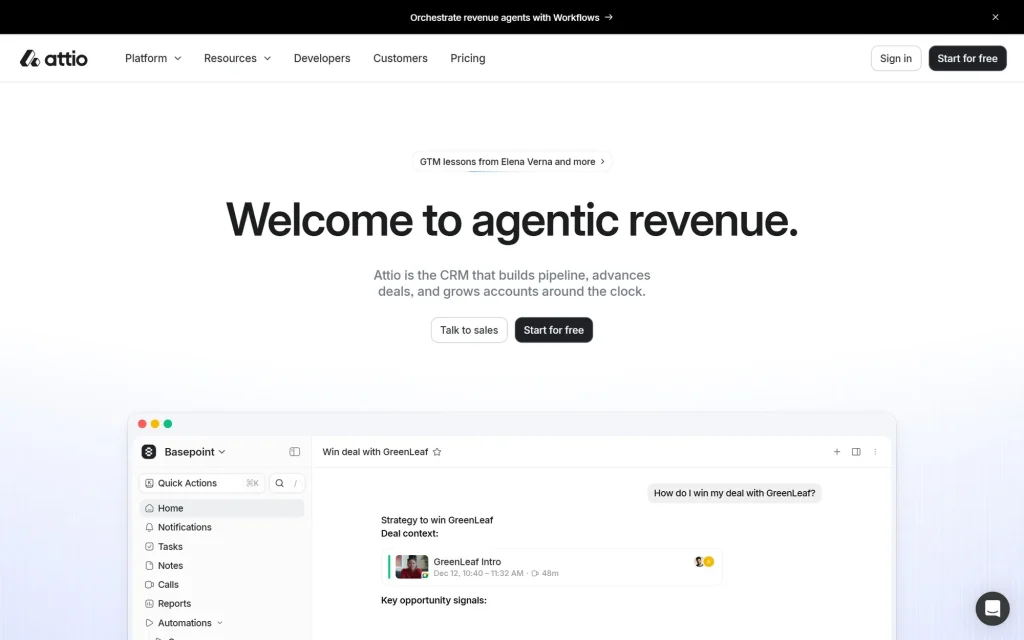 Screenshot: attio.com, September 2026
Attio is a CRM that competes with much older, bigger products by looking and feeling modern. Its homepage centres a large headline, “Welcome to agentic revenue.”, over a soft lavender gradient and a crisp product screenshot, followed by a grid of customer logos.
👍 UX/UI strengths
- A light, airy look that makes a CRM, usually the dullest software in the company, look inviting.
- A clear, dark “Start for free” button stays in the navigation as you scroll.
- Customer logos are shown as a tidy grid of equal tiles, some linking to customer stories.
👎 Areas for improvement
- “Agentic revenue” is jargon: a first-time visitor has to read the smaller line underneath to learn it is a CRM.
- An announcement bar, a cookie banner and a chat bubble all appear on the first screen.
- Like Ramp, it splits headlines into dark and light grey halves, and the grey half is harder to read.
Borrow this: equal-sized logo tiles look calmer than a scrolling logo strip.
8. Notion – Workspace and AI
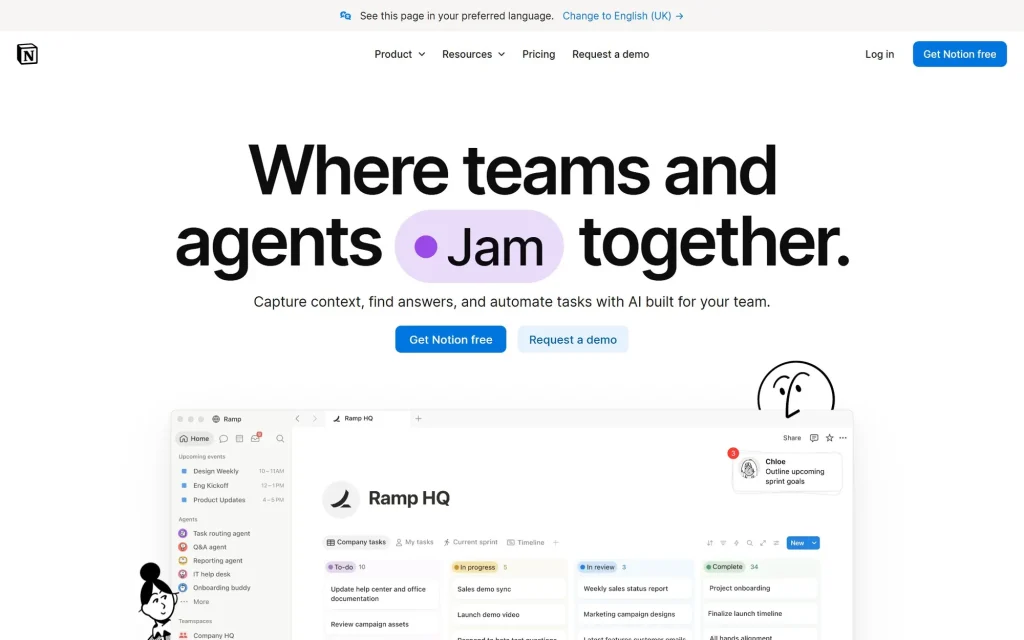 Screenshot: notion.com, September 2026
Notion’s homepage keeps its friendly personality: hand-drawn characters, a big headline, “Where teams and agents … together.”, where the verb in a coloured pill keeps changing (Think, Ship, Create, Build), and a real workspace view underneath.
👍 UX/UI strengths
- Two clear buttons for two audiences: “Get Notion free” for individuals and “Request a demo” for companies.
- A dense logo wall right below the product view (“The most ambitious companies run on Notion”).
- Bento-style feature cards, each with a short title and a real screen, are easy to scan.
👎 Areas for improvement
- The changing word in the headline is eye-catching but harder to read, and moving text can bother some visitors.
- AI messaging now dominates; the everyday uses people know Notion for (notes, docs, wikis) are further down.
- The page is long, with many sections that look alike.
Borrow this: one button for self-serve sign-up, one for sales.
What the old list said, and what changed
| Site | September 2026 |
|---|---|
| AirOps | Repositioned from AI content workflows to AI search visibility; full redesign |
| Ghost | New homepage built around the dashboard; Ghost 6.0 launched |
| Ramp | Customer stories added (our 2025 complaint), AI agents in the messaging |
| ClickUp | “Software to replace all software”, with AI agents and even more features |
| Copilot | Now Assembly; copilot.com belongs to Microsoft Copilot |
Which CMS is best for a SaaS website?
There is no single best one, and the eight sites above prove it. Looking at the code of each homepage in September 2026, they fall into three groups:
| Built with | Sites |
|---|---|
| Webflow (visual builder with a built-in CMS) | AirOps |
| Next.js with a headless CMS (Contentful or Storyblok) | ClickUp, Notion, Assembly (Contentful); Attio (Storyblok) |
| Next.js, CMS not visible | Ramp, Linear |
| Hugo (a static site generator) | Ghost’s own marketing site, interestingly, not Ghost |
How to choose for your own SaaS website:
- Webflow or Framer if designers and marketers will build and change pages themselves. Both are visual, publish fast and include a CMS for blogs and changelogs.
- WordPress if content and SEO matter most and you want the biggest choice of themes, plugins and people who know it. It runs 40.2% of all websites (W3Techs, September 2026). The trade-off is updates and maintenance.
- A headless CMS (Contentful, Storyblok, Sanity) with a custom front end, as the bigger companies above use, if you have developers and need full control, speed and many languages. It costs more to build.
- Ghost if your marketing is mainly a blog and a newsletter.
The honest test: can your marketing team publish a new landing page this afternoon without asking a developer? If not, the CMS is slowing you down, whatever its name.
Final thoughts: what makes a great SaaS website in 2026?
Across these eight sites, the same priorities keep showing up:
- Say what it is: the clearest sites (Ramp, Ghost) explain the product in one line. The weakest moments are jargon and slogans.
- Show the product: six of the eight put the real interface in or right under the hero.
- One easy first step: an email field or one button, with the questions that stop people (price, credit card) answered next to it.
- Proof early: customer logos and results directly below the hero.
- Simplicity and performance: clean interfaces and fast pages still win, and busy pages still lose people.
- Stand out from the AI crowd: almost every headline now mentions agents. The sites that explain what their agents actually do are the ones you remember.
FAQ
Which CMS is best for SaaS websites?
It depends on who will edit the site. Webflow or Framer suit design-led marketing teams, WordPress suits content-heavy sites, and larger SaaS companies often use a headless CMS such as Contentful or Storyblok with a custom Next.js front end.
What makes a good SaaS website?
A one-line explanation of what the product does, the real product shown early, one easy way to start, and customer proof near the top, on a page that loads quickly.
Why do so many SaaS websites show the product in the hero?
Because a real screen answers “what would I actually be using?” faster than any slogan. Ghost, ClickUp, Linear, Attio and Notion all do it.
What happened to Copilot from the 2025 list?
The client-portal company now trades as Assembly, at assembly.com, and has added an AI app builder. The copilot.com domain now belongs to Microsoft Copilot.
Design better SaaS products with us
If you’re looking to build a high-converting SaaS website, join our UX/UI course at Web Courses Bangkok to learn how to research, design and test pages like these. It is run as a private workshop for your team, on your schedule.
Header photo: Carlos Muza / Unsplash